We explain and teach technology, solve tech problems and help you in Technology.

We explain and teach technology, solve tech problems and help you make gadget buying decisions.
Showing posts with label Technology. Show all posts

Monday, 23 September 2019

September 23, 2019

Kotlin Introduction in हिंदी

KOTLIN :-

                         
                                                                                      Kotlin

Java एक perfect language नहीं है। इसे बहुत पहले develop किया गया था। तब से लेकर अब तक कई नयी technologies market में आ चुकी है और कई technologies बदल चुकी है।
उदाहरण के लिए कई ऐसे features है जो C# language में available है और java में नहीं है। लेकिन java की stability के कारण java अभी भी programmers की पसंद बनी हुई है। Kotlin इन समस्यों को दूर करके java को और भी मजबूत और वर्तमान परिपेक्ष्य में उपयोगी बनाती है।
इसके अलावा java में कुछ ऐसे features की कमी भी है जो android development के लिए जरुरी है। इसलिए यदि android development के लिए सिर्फ java का ही प्रयोग किया जाये तो इससे यह programmers को limited बनाती है।
यही कारण है की Google द्वारा kotlin का support provide किया गया है। इसका मुख्य उद्देश्य ऐसे features जो java में नहीं है उन्हें ऐसी language द्वारा implement किया जाये जो java के साथ support या extension के रूप में कार्य कर सकती है।
हालाँकि Kotlin एक independent language है और इसमें potential भी है लेकिन जैसा की मैने पहले कहा इसे मुख्यतः JVM (Java Virtual Machine) पर run होने के लिए ही design किया गया है, ताकि java के साथ इसे use किया जा सके।
Kotlin के द्वारा वह सब किया जा सकता है जो java के द्वारा आप अब तक करते आये है। इसके अलावा कुछ नए features भी kotlin में है जो इसे unique और कई सन्दर्भों में useful बनाते है।
Java से हटकर kotlin object oriented और functional दोनों प्रकार से कार्य करती है। इससे Kotlin का दायरा बढ़ जाता है और इससे अलग अलग types के projects के लिए Kotlin को उपयोग किया जा सकता है।
Kotlin एक statically typed programming language है जो Java Virtual Machine (JVM) पर run होती है। इसे JavaScript source code के रूप में भी compile किया जा सकता है।
इसके अलावा Kotlin को android applications create करने के लिए भी use किया जाता है। Kotlin से android applications create करना बहुत fast और आसान हो जाता है।
Kotlin को व्यापक रूप से स्वीकारे जाने का कारण यह है की Kotlin java के साथ compatible है। इसके साथ काम करने के लिए आपको कुछ ज्यादा नया करने की आवश्यकता नहीं है।
JVM पर run किये जाने पर Kotlin java की ही तरह byte code generate करती है। आप Kotlin और Java को एक ही project में use कर सकते है। यदि कोई ऐसा code है जो Kotlin में ज्यादा बेहतर तरीके से काम करेगा तो आप उसे Kotlin में implement कर सकते है।

History of Kotlin

Kotlin को JetBrains company द्वारा 2010 में create किया गया था। इसकी first public release 2011 में हुई थी। JetBrains द्वारा ही IntelliJ IDEA (Java IDE) create किया गया था। इसी IDE के आधार पर Android Studio भी create किया गया है।
मई 2017 में Google ने Kotlin को अपना support provide किया। इसके साथ ही Google ने यह भी announce किया की Kotlin android applications create करने के लिए एक नयी programming language है। तब से Kotlin को दुनिया भर के developers द्वारा widely accept किया गया है।
Java और C++ के अलावा Kotlin भी अब android application development के लिए एक official language बन चुकी है। Google द्वारा इसे android development के लिए first class language कहा गया है।

Features of Kotlin

Kotlin एक नयी programming language है। इसमें कुछ ऐसे features है जो java में नहीं है और जो इसे java की जगह पर उपयोग किये जाने के सक्षम बनाते है। इन features के बारे में निचे बताया जा रहा है।

Java Interoperable

जैसा की पहले बताया गया है Kotlin और Java interoperable है। Kotlin JVM पर run की जाती है और Java की ही तरह byte code generate करती है। Java और kotlin को आप एक साथ use कर सकते है। जो कार्य आप Java द्वारा नहीं कर सकते उन्हें Kotlin द्वारा कर सकते है।

Compiles to JavaScript

Java byte code के अलावा Kotlin को JavaScript में भी compile किया जा सकता है। आप Kotlin code लिखकर उसे .js extension से save कर सकते है और अपने web page में use कर सकते है। ऐसा करने पर kotlin का code JavaScript की ही तरह execute हो जायेगा। Kotlin का यह feature JavaScript को और भी strong बनाता है और उसके कार्य क्षेत्र को बढ़ाता है।

Concise

यदि आप Java के स्थान पर Kotlin का प्रयोग करते है तो आपको कम code लिखना होगा। जो task आप Java में कई lines लिखकर perform करते है वे operations Kotlin द्वारा कुछ ही lines में perform किये जा सकते है। इससे programmers को कम code लिखना पड़ता है और उनका समय बचता है। इससे program की redability और clarity भी बढ़ जाती है।

Syntax similar to Java

कोई भी programmer जो Java के साथ कार्य कर चुका है वह आसानी से Kotlin को use कर सकता है। Kotlin और java का code लगभग similar है और ज्यादातर programmers के लिए यह familiar है। Java programmers इसे जल्दी से सिख सकते है और उपयोग कर सकते है।

Null Safety

Kotlin Null reference safety provide करती है। कई बार Java में Null reference वाले member को access करने का प्रयास किया जाता है तो exception generate हो जाती है और application काम करना बंद कर देती है। ऐसा कई बार बड़ी बड़ी organizations के softwares के साथ हो चूका है जिससे उनका काम रुक जाता है और उन्हें लाखों का नुक्सान हो जाता है।
Kotlin ऐसे code को compile ही नहीं करती है जो Null assign या return करता है। इससे application को Null safety मिलती है और future में generate होने वाली errors से आप बच जाते है।

Extension Functions

Extension functions को Kotlin के सबसे महत्वपूर्ण features में से एक माना जाता है। ये ऐसे functions होते है जिनके द्वारा आप किसी class की functionality या उसकी कार्य क्षमता को extend (बढ़ा) कर सकते है। इसके लिए यह आवश्यक नहीं है की आप उस class के code में परिवर्तन करें।
Extensions आपको ऐसी ability provide करते है की आपको class के code को छूने की भी आवश्यकता नहीं होती है। इन्हें create करना बहुत ही आसान है और ये वास्तव में बहुत ही उपयोगी भी है

                               कोटलिन में बने एप्प्स 

Many apps are already built with Kotlin—from the hottest startups to Fortune 500 companies.
  • Slack
  • Lyft
  • Robinhood
  • Evernote
  • Square
  • Deliveroo
  • Periscope
  • Udacity
  • Instacart
  • Basecamp
  • Pocket
  • Camera360
  • Trello
  • Foursquare
  • Stride
  • Amex
  • Expedia
  • Netflix
  • Kindle
  • Keepsafe
  • NYTimes
  • Nova Launcher
  • Wordpress
  • Simple
  • Airbnb
  • Flipboard
  • Foursquare Swarm
  • WeChat
  • GO-JEK
  • Confluence Cloud
  • Zola Sales
  • Juno
  • Adobe Acrobat Reader
September 23, 2019

25 Amazingly Interesting YouTube Facts You Should Know

YouTube is the world’s favorite video platform, but there’s a lot you probably don’t know about the site. With that in mind, here are some amazingly interesting YouTube facts for you to check out.


1. YouTube Began on Valentine’s Day

The YouTube.com domain was bought on Valentine’s Day, 2005. The first video was posted by co-founder Jawed Karim a little over two months later.

2. PayPal Funded YouTube’s Launch

The three YouTube founders—Chad Hurley, Steve Chen, and Jawed Karim—all worked for PayPal. They used their money from eBay’s buyout of PayPal to fund the site’s early development.

2. Google Owns YouTube

Google acquired YouTube for $1.65 billion in October 2006. Which was a lot of money at the time, but looks like a pittance now considering the value of YouTube.

3. Ads Appeared in 2007

Google is the largest ad company in the world, and it didn’t take long for it to start monetizing YouTube. The service’s first ad was broadcast in August 2007, just nine months after Google bought the site.

4. There Are Localized Versions of YouTube

In June 2007, YouTube started rolling out localized versions of its site. People in different places would get different recommendations and features, as well as a localized top-level domain (for example, .com, .co.uk, .fr, etc.).
The first 10 countries to get their own YouTube site were the U.S., U.K., Brazil, France, Ireland, Italy, Japan, the Netherlands, Poland, and Spain.

5. There Are 98 Versions of YouTube

youtube mexico home screen
Fast-forward to today, and the localization program has expanded dramatically. More than 98 countries now have their own version. The most recent went live in January 2019. They were Bolivia, Costa Rica, Ecuador, El Salvador, Guatemala, Honduras, Nicaragua, Panama, and Uruguay.

6. YouTube Has Been Censored Around the World

YouTube’s mission to get into households on every corner of the planet has not always been plain sailing. At various times, more than 25 countries have blocked access. All the usual suspects are there, as well as some surprises such as Germany, Finland, and Brazil.

7. YouTube Is Worth Billions

Today, YouTube’s annual revenue hovers around $15 billion. This has led Wall Street analysts to give the brand a value of more than $100 billion.

8. Americans Are Addicted to YouTube

In any given month, 80 percent of North American adults aged between 18 and 49 watch at least one video on YouTube.

9. YouTube Has More Reach Than Cable TV

In the United States, YouTube reaches more 18 to 49-year-olds than any broadcast or cable TV network.

10. YouTube Is Growing in Popularity

YouTube’s assault on traditional forms of television shows no signs of abating. The most recent data available shows that the time spent on YouTube has been enjoying double-digit percentage growth. At the same time, time spent watching TV is seeing a double-digit decline.

11. Ronaldinho Was First to 1 Million Views


For many soccer fans, Brazilian forward Ronaldinho is one of the greatest players to have ever played the game.
Thanks to his worldwide popularity, his tricks video (produced by Nike) was the first video to hit one million views in October 2005.

12. Avril Lavigne Was First to 100 Million Views

Avril Lavigne’s chart-topping hit Girlfriend was the first song to break 100 million views after its release in 2008. There was some controversy around how the video amassed its views, with Lavigne’s PR company accused of gaming the system.

13. Gangnam Style Was First to 1 Billion Views

The first video to smash through the 1 billion barrier was PSY’s global megahit, Gangnam Style. The South Korean artist achieved superstardom on the back of its success, with the U.N. calling the singer a “force for world peace.” A bit of an exaggeration, we’re sure you’ll agree.

14. Spanish Language YouTube Is Growing


The first Spanish-language video on YouTube to amass more than 1 billion views was Enrique Iglesias’ reggaeton song, Bailando.

15. The Most Popular Non-Music Video Is in Russian

The only non-music video in the most watched YouTube videos of all time is a Russian-language version of an episode of kids’ TV show, Masha and The Bear. It has been watched 3.4 billion times and counting.
The Most Viewed YouTube Videos Ever The Most Viewed YouTube Videos EverThe most viewed YouTube video has over five billion views. Which of these most liked and watched YouTube videos have you seen?READ MORE

16. 17 Videos Have Held the Number One Crown

In total, 17 different videos have held the record for being the most watched video on YouTube. The current holder is Luis Fonsi’s hit, Despacito. It took the record off Wiz Khalifa’s See You Again when it hit 2.9 billion views.

17. Justin Bieber’s Baby Isn’t the Most Hated Video


For a long time, the most disliked video on YouTube was the Justin Bieber song, Baby. It had received more than 10 million “thumbs down” in the nine years it had been live.
However, in December 2018 the record was smashed in spectacular fashion by YouTube Rewind 2018. In its first month of availability, it racked up an incredible 15 million downvotes.


18. HD Videos Went Live in 2009

We couldn’t start watching YouTube in high definition until the feature’s global rollout in November 2009.

19. YouTube Boasts 57,000 Years of Video Footage

The average video length on YouTube is four minutes and 20 seconds, and there are approximately 7 billion videos on the website in total.
We did some math (!) and can confirm that it would take around 30 trillion minutes to watch them all. Or, to put it another way, 58,000 years.

20. People Have Short Attention Spans

It’s safe to assume that the majority of those 7 billion videos are not worth watching. And it turns out that we give short shrift to videos that don’t immediately grab our attention. More than 20 percent of videos are switched off within the first 10 seconds of playback.

21. We All Watch Too Much YouTube


One person probably couldn’t get through all 58,000 years of YouTube. However, collectively, we make a darned good effort. We watch four billion hours of video every month—that’s 456,621 years worth!

22. YouTube Search Is Bigger Than Bing

YouTube is the second largest search engine in the world. It processes more queries than Bing and Yahoo combined.
Of course, it means Google also owns the world’s two most popular search engines. We’re not sure that level of centralization is a good thing.

23. A Decade of New Video Is Uploaded Every Day

YouTube sees 72 hours of newly uploaded video every minute. Over a 24-hour period, that’s more than a decade of new footage.

24. Tony Blair Is a YouTube Pioneer

Today, YouTube is well established as an essential way for politicians to get their message out to the public. That wasn’t always the case. In 2007, then-British Prime Minister Tony Blair became the first world leader to launch his own YouTube channel.

25. YouTube Isn’t the Number One Website

Despite all of these amazing statistics, YouTube is still only the second most visited site in the world (behind Google.com).
According to Alexa.com, Facebook, Baidu, and Wikipedia round out the rest of the top five.

YouTube’s Phenomenon Facts and Figures

So there you have it; that’s our list of the most interesting YouTube facts. The statistics are truly mind blowing, especially when YouTube didn’t even exist until relatively recently.
If you enjoyed our list of YouTube facts, make sure you check out some of our similar articles. We have also written. There are these surprising facts you didn’t know about Vimeo and interesting facts you didn’t know about Netflix.

                                                                 TECHYPEDIA

Saturday, 7 September 2019

September 07, 2019

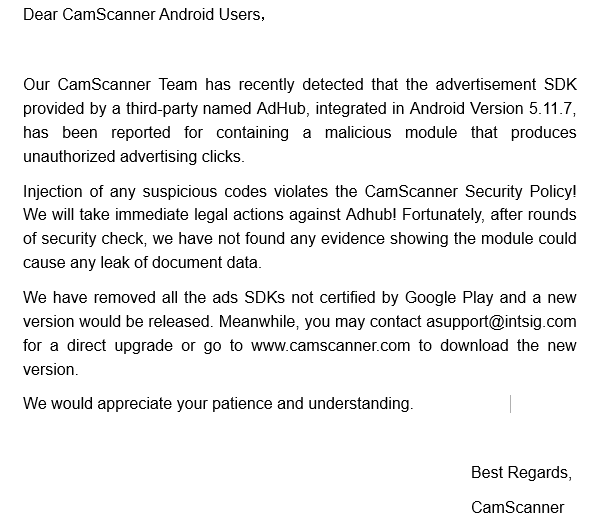
CAMSCANNER is Malware?

CAMSCANNER RESPONDS AFTER GOOGLE REMOVES APP FROM PLAY STORE DUE TO TROJAN DROPPER MALWARE SCARE.


CamScanner has acknowledged that a malicious module was present in the advertisement SDK of CamScanner Version 5.11.7. The SDK was apparently provided by a third-party called AdHub and was producing unauthorised ad clicks. The company claims that it will take immediate legal action against Adhub since injection of any suspicious code violates the company's security policy. Additionally, no evidence of any document leaks has been found after 'rounds of security checks.' CamScanner has apparently removed all the ad SDKs that are not certified by Google Play and is releasing a new version that can be currently downloaded from the company's website.


ATTENTION, ALL ANDROID USERS! To address your recent concerns, we are here to make the following statement and you may download the new version: https://s.intsig.net/software/CamScanner-5.12.5.20190827-51253-Market-release.apk 


View image on Twitter


There’s a good chance that you know about the CamScanner app, which is available on both Android and iOS. The ‘Phone PDF Creator’ or ‘Scanner to Scan PDFs’ app had over 100 million downloads, before being booted from the Google Play Store. Researchers at Kaspersky Labs found a malware in the recent versions of the popular OCR (optical character recognition) app. It was apparently harbouring an advertising library containing a malicious module that the Kaspersky researchers identified as ‘Trojan-Dropper.AndroidOS.Necro.n.’  As per the report, this particular malware module was previously spotted in a few apps that came preinstalled on some Chinese smartphones. 
The malware module was spotted only on the Android version of the app and it seems like its iOS version is still available on the App Store, probably because of Apple’s strict app vetting policies. As the Kaspersky blog notes, CamScanner was a pretty good app that offered notable functionality. While it displayed ads for generating revenue, there were options for in-app purchases and buying a License separately for eliminating ads. However, the Trojan Dropper module found within the app is said to extract and run another malicious module from an encrypted file included in the app’s resources. 

“This “dropped” malware, in turn, is a Trojan Downloader that downloads more malicious modules depending on what its creators are up to at the moment. For example, an app with this malicious code may show intrusive ads and sign users up for paid subscriptions,” the Kaspersky blog states. We checked to find that the CamScanner app has been removed from the Google Play Store. However, Kaspersky reports that the app’s developers removed the malicious code with the latest update. However, since the apps’ version varies for different devices, it is recommended that one uninstalls it as their device might have an older version of that app that contains the Trojan Dropper malware module. 

This is not the first time an app has slipped past through the Google Play Store’s app vetting process. While it can also be difficult to keep up with thousands of apps and their updates that are being released on the platform, Google needs to step up its game if it wants to assure users that the Play Store is the safest place to download Android apps from. 

                                                       Visit the site
September 07, 2019

क्या है wireless charging और कैसे काम करती है ?


क्या है wireless charging और कैसे करती है ?


वायरलेस चार्जिंग, ऐसी कोई नई या यूनीक तकनीको नहीं है जिसे हम पहली दफा ही देख रहे हों। पैनासोनिक के इलेक्ट्रिक रेजर ने इसे बहुत समय से इस्तेमाल किया जा रहा है। इसके अलावा और भी बहुत से डिवाइसेस में इसे काफी समय से इस्तेमाल किया जाता रहा है। हालाँकि इसके बहुत स्थानों पर इस्तेमाल होने के बाद अगर इसे किसी स्मार्टफोन में शामिल किया जा रहा है तो यह अपने आप ने एक नई तरह ही खोज ही कही जायेगी, क्योंकि आजकल के दौर में स्मार्टफ़ोन किसी भी व्यक्ति के लिए एक सबसे जरुरी वस्तू बन गया है। हालाँकि वायरलेस चार्जिंग को लेकर सभी के मन में कई बड़े सवाल होते हैं कि आखिर इसे कैसे इस्तेमाल किया जा सकता है और यह क्या है, एक सबसे बड़ा सवाल है। यह सवाल महज मेरे मन में ही नहीं है बल्कि हम सब के मन में जबसे हमने सुना कि इसे स्मार्टफोंस में भी इस्तेमाल किया जा रहा है, सभी के मन में है। इसके अलावा एक सवाल और है कि आखिर आपको क्यों अपने अगले स्मार्टफोन में यह तकनीको क्यों चाहिए। तो आइये इन सभी सवालों के जवाब तलाशने की कोशिश करते हैं।

क्या है वायरलेस चार्जिंग?

यहाँ सबसे पहला सवाल जो आता है वह यह है कि आखिर वायरलेस चार्जिंग है क्या? उसके बाद बाकी सभी सवाल आते हैं। तो आपको बता दें कि वायरलेस चार्जिंग कोई जादू नहीं है इसके लिए आपको फिर भी वायर की जरूरत होगी है। हालाँकि अंतर महज इतना होता है कि आपको इस वायर को डायरेक्ट अपने फोन से कनेक्ट करने की जरूरत नहीं होती है इसके अलावा आप इसे एक चार्जिंग बेस से कनेक्ट करते हैं। यह चार्जिंग बेस किसी भी साइज़ और शेप का हो सकता है। यह एक कार डैश की तरह होता है। जैसे ही आप अपने फोन को इस बेस पर सही जगह रखते हैं तो यह अपने आप ही काम करना शुरु कर देता है। 
smartphone-wireless-charging-stock-image
इसका सबसे बड़ा उदाहरण महज यही हो सकता है कि आप अपने डेस्क पर काम कर रहे हैं, और इसी डेस्क पर आपको एक बेस रखा मिल जाए, इसके अलावा आप इस समय अपने फोन पर ज्यादा कुछ कर भी न रहे हों तो आप अपने फोन को चार्ज कर सकते हैं। जब आपको अपने फोन को इस्तेमाल करना हो तो आपको किसी वायर को इससे अलग करने की जरूरत नहीं है बस आप इसे यहाँ इस बेस से उठाएं और काम करना शुरू कर दें। हालाँकि वायरलेस चार्जिंग क्विक चार्ज की तरह तेज नहीं होती है। हालाँकि इससे चार्जिंग करना बहुत ही सरल जरुर हो जाता है। और यहीं आपको इसके महत्त्व के बारे में पता चलता है।
galaxy-s3-wireless-charging

वायरलेस चार्जिंग कैसे करती है काम?

वायरलेस चार्जिंग दो डिवाइसों के बीच कम पावर संकेतों को संचारित करने के लिए दो गुंजयमान आगमनात्मक युग्मक का उपयोग करती है। यह विशेष रूप से सामान्य वायर्ड कनेक्शन की तरह एक दूसरे को छूने के बिना बिजली संचारित करने के लिए डिज़ाइन की जाती है। बेस स्टेशन, जो अपनी बिजली की आपूर्ति के माध्यम से दीवार में प्लग किया गया है, में एक ट्रांसमीटर कॉइल है और आपके फोन में एक रिसीवर कॉइल है। इसके अलावा सिग्नल की तरंग तब नियंत्रित होती है और आवर्ती चार्जिंग शुरू होती है। 
Apple-iPhone-8--wireless-charging-Liveblog
आगमनात्मक चार्ज उन दो विशेष रूप से डिज़ाइन किए गए विद्युत चुम्बकीय कॉइल का उपयोग करता है, जो दो उपकरणों के बीच एक चुंबकीय क्षेत्र का निर्माण करते हैं। इसमें एक जटिल प्रक्रिया शामिल है जो चुंबकीय क्षेत्र को संभावित और दोलन के अंतर के माध्यम से बिजली का उत्पादन करने की अनुमति देती है। आपके एंड्रॉइड डिवाइस में कुंडली बैटरी चार्जिंग सर्किट से भी जुड़ा है, और आपकी बैटरी को चुंबकीय क्षेत्र द्वारा प्रेरित ऊर्जा का उपयोग करने पर चार्ज किया जा सकता है। 
turn any smartphone into wireless charging one

इसे सही प्रकार से ऐसे भी समझ सकते हैं:

1. आपके एंड्राइड डिवाइस और चार्जर में प्रत्येक के पास विशेष विद्युत कॉयल हैं।
2. जब दो कॉइल्स पर्याप्त रूप से मिलते हैं, तो वे कुंडल में छोटे दोलन (कंपन) बनाने के लिए चुंबकत्व का उपयोग करते हैं और आपके फोन के अंदर कुंडली द्वारा ईएमएफ बनाया जाता है।
3. यह ईएमएफ आपके फोन में चार्जिंग सर्किट के माध्यम से छोटी मात्रा में बिजली भेजता है और बैटरी को चार्ज करता है।
4. यह काफी महँगी प्रक्रिया और चार्जिंग में काफी समय भी लेती है, और जब आप इसे अपने फ़ोन से प्लग करते हैं तो यह अधिक गर्म हो जाता है क्योंकि यह तारों को पारंपरिक तरीके से जोड़ने से कम कुशल है।
Apple iPhone wireless charging

क्यों आपको वायरलेस चार्जिंग की जरूरत आपके अगले फोन में है?

अगर हूँ चार्जिंग के स्टैण्डर्ड की चर्चा करें तो एक साधारण प्रणाली में हम किसी भी डिवाइस को किसी भी अन्य चार्जर से चार्ज कर सकते हैं, और ऐसा हम कई बार करते भी हैं। लेकिन वायरलेस चार्जिंग में ऐसा नहीं किया जा सकता है, क्योंकि डिवाइस के हिसाब से ही बेस का निर्माण किया जाता है, और आपका फोन वायरलेस चार्जिंग को सपोर्ट भी करना चाहिए, अगर ऐसा नहीं है तो अपने फोन को चार्ज ही नहीं कर सकते हैं, फिर आपको उसी पुरानी प्रणाली पर ही जाना होगा। और भविष्य में ऐसा होने वाला है कि सभी फोंस के साथ हमें यह तकनीकी देखने को मिलने वाली है, क्योंकि कंपनियां इस प्रणाली को अब धीरे धीरे अपने फोंस में लाती जा रही हैं, यह कुछ महँगी जरुर होती है। लेकिन आने वाले समय इसे ही इस्तेमाल में लिया जाने वाला है। एक सबसे महत्त्व पूर्ण बात यह है कि इस तरह की प्रणाली यानि वायरलेस चार्जिंग से आपके फोन में कुछ भी बदलता नहीं है। और न ही यह कुछ अलग से काम करना शुरू कर देता है लेकिन आपके उस तरीके में जरुर बदलाव आता है जैसे आप अपने फोन को इस्तेमाल करते हैं।

                                            Visit the Site to get all updates

Friday, 6 September 2019

September 06, 2019

what is 4K HD Quality?

4K HD Quality क्या है – पूरी जानकारी

4K Kya Hai Or Kaise Kaam Karta Hai

दुनियाभर में 4K टेक्नोलॉजी का विकास अपनी चरम सीमा पर है। लगातार टेक्नोलॉजी के क्षेत्र में नए नए विकास ओर अविष्कार हो रहे हैं जिससे लोगों को टेक्नोलॉजी का पूरा फायदा मिल रहा है और लोग अपनी आम जिंदगी और टेक्निकल ज़िन्दगी को ओर ज्यादा बेहतर बना रहे हैं। अगर हम टेक्नोलॉजी की बात करें पिक्चर क्वालिटी के क्षेत्र में तो पिछले कुछ सालों से इस क्षेत्र में बहुत विकास हुआ है और बहुत कुछ बदलाव देखने को मिले हैं।
पहले साधारण पिक्चर क्वालिटी होती थी, जिसको आप SD पिक्चर क़्वालिटी भी कहते हैं। उसके बाद HD पिक्चर क्वालिटी का विकाश हुआ, फिर 3D पिक्चर क्वालिटी का ओर उसके बाद Full HD का विकाश हुआ, जिससे आपकी फिल्में देखने, मोबाइल डिस्प्ले व लैपटॉप क्वालिटी, मोबाइल व लैपटॉप पर वीडियो देखने का अंदाज ही बदल गया। आप अब बेहतर क्वालिटी में वीडियो, फिल्मों और अच्छी व Full HD डिस्प्ले का मजा ले सकते हैं। Full HD वीडियो और डिस्प्ले क्वालिटी आपने के बाद आपका मोबाइल, लैपटॉप इत्यादि इस्तेमाल करने का नजरिया ही बदल गया है।

लेकिन जैसे जैसे Full HD क्वालिटी पुरानी हो रही है, लोगों का अब इससे लगाव कम होने लगा है और अब लोग Full HD से भी बढ़कर सोचने लगे हैं और इसमे ओर ज्यादा सुधार की इच्छा करने लगे हैं। शायद यही वजह है कि अब इन सब के बाद पिक्चर क्वालिटी का एक नया रूप देखने को मिला है, जिसको 4K कहा जाता है। अब आपको एक ऐसी पिक्चर क्वालिटी देखने को मिल रही है, जिसके जरिये आपको Full HD से भी बेहतर अनुभव मिलेगा। अब लोग 3D, HD ओर Full HD को छोड़कर 4K की तरफ ज्यादा बढ़ रहे हैं।
यही वजह है कि 3D व full hd पिक्चर क्वालिटी के बाद दुनियाभर के वैज्ञानिक तेजी से “4K Picture Quality” पर काम कर रहे हैं। मौजूदा Full HD के बाद अब 4K रेजोल्यूशन की बारी है। ऐसे बहुत से गैजेट्स हैं जिनमें आपको 4K पिक्चर क्वालिटी देखने को मिल जाएगी ओर ऐसे बहुत से लोग हैं जो 4K टेक्नोलॉजी का इस्तेमाल भी करते हैं।
हालांकि 4K पिक्चर क्वालिटी आ चुकी है और यह आपको बहुत से TV, Laptop या smartphones इत्यादि में देखने को मिल गयी होगी और आपने इस्तेमाल भी किया होगा, लेकिन अभी भी ऐसे बहुत से लोग हैं जिनको 4K पिक्चर क्वालिटी के बारे में अच्छी तरह से पता नहीं है और उन्होंने इसका इस्तेमाल नहीं किया। बहुत से लोग आज भी 4K से अनजान हैं।
इसलिए आज हम यह पोस्ट खाश 4K picture quality पर ही लेकर आए हैं। आज हम इस पोस्ट के माध्यम से आपको 4K के बारे में अच्छी तरह से बताएंगे कि यह क्या है, कैसे काम करता है ओर कौन कौनसे Tech डिवाइसों में 4K picture quality आ गयी है। आज की इस पोस्ट में मैं आपको 4K के बारे में पूरी तरह से बताऊँगा, इसलिए 4K के बारे अच्छी तरह से जानने के लिए आप मेरी यह पोस्ट ध्यान से ओर अंत तक पढें।
तो चलिए दोस्तों, शुरू करते हैं ओर जानते हैं कि 4K पिक्चर क्वालिटी क्या है और यह कैसे काम करती है व आपको यह कौन कौनसे Devices में मिल सकती है।

4K Kya Hai or Kaise Kaam Karta Hai: 4K HD Quality Ke Baare Me Poori Jankari Hindi Me


4K Kya Hai

Kya Hai ‘4K’

याद करें पहली बार HD TV पर फुल HD कंटेंट देखने पर आपकी प्रतिक्रिया क्या थी। उस समय डिटेल के लेवल ने आपको चुकाया होगा। स्वाभाविक बात है कि जैसे-जैसे TV का आकार बढ़ता है, वैसे-वैसे इमेज जनरेट करने के लिए इस्तेमाल होने वाले पिक्सल्स की संख्या भी बढ़ती है। अभी आपको 5 इंच या 5.5 इंच के स्मार्टफोन में फुल HD रिज़र्वेशन (1920 ×1080) पिक्सल मिल रहा है। इसमें आपको बहुत टाइट पैक्ड पिक्सेल मिलते हैं। इसमें पिक्सल्स की सघनता ज्यादा होती है।
46 इंच या इससे ज्यादा के फुल HD TV में आप स्क्रीन के पास खड़े होकर आसानी से अलग-अलग पिक्सल्स को देख सकते हैं। इससे भी ज्यादा रिज़ोल्यूशन के 4K (3840×2160 पिक्सेल) पैनल में पिक्सल्स की और ज्यादा सघनता होती है। इससे हर चीज की शार्पनेस बढ़ जाती है। 4K कंटेंट के साथ आपको उसी तरह की फीलिंग होती है, जैसे आप स्टैंडर्ड कंटेंट से हाई डेफिनेशन कंटेंट की तरफ जा रहे हैं।

यही 4K है। अर्थात 4K में आपको Full HD से भी हाई पिक्सेल्स या पिक्चर क्वालिटी मिलती है, जिससे आप अपने स्मार्टफोन या स्मार्ट TV में हर एक चीज़ को Full HD के मुकाबले कहीं ज्यादा बारीकी से देख सकते हैं। 4K की वजह से आपके सामने पिक्चर क्वालिटी की एक ओर ही क्लेरिटी होगी और आपको हर एक चीज़ या कंटेंट किसी भी अन्य पिक्चर क्वालिटी के मुकाबले कहीं ज्यादा clear दिखाई देगी।
4K
4K या 4096×2160 (3840×2160 पिक्सल्स TV के लिए) पिक्सेल्स Full HD (1920×1080 Pixels) की तुलना में चार गुना ज्यादा पिक्सेल्स ओर चार गुना ज्यादा रेजोल्यूशन है। उदाहरण के तौर पर 1920 pixel बाईं से दाईं तरफ हैं और 1080 pixels ऊपर से नीचे हैं। इन नंबर्स को गुणा करके आप पता लगा सकते हैं कि image generate करने के लिए पैनल पर कितने पिक्सेल्स का इस्तेमाल होता है। हाई क्वालिटी पिक्सेल्स की यह पिक्चर क्वालिटी ही 4K है।


क्या क्या उपलब्ध है 4K में

अभी 4के कंटेंट कम आ रहा है लेकिन धीरे धीरे इसको बढ़ावा मिल रहा है और बहुत से गैजेट्स में 4K पिक्चर क्वालिटी दी जा रही है। भविष्य में सैटेलाइट केबल बॉक्स से 4K कंटेंट को सीधे आप तक ब्रॉडकास्ट किया जाएगा। ‘4K’ ब्लू-रे प्लेयर्स ओर डिस्क्स आम बात हो जाएगी। वीडियो और स्टिल कैमरे ‘4K’ रिकार्डिंग को सपोर्ट करेगें। HDMI के माध्यम से कंप्यूटर 4K के आउटपुट ओर प्लेबैक को सपोर्ट करेगा। SR लिक्विड S2 की तरह स्मार्टफोन्स 4K वीडियो रिकॉर्डिंग कर पाएंगी। भविष्य में एक्सबॉक्स वन की तरह गेम कंसोल्स 4K आउटपुट को सपोर्ट करेंगे।
आज ऐसे बहुत से स्मार्टफोन, Smart TV ओर कैमरा आते हैं, जो 4K पिक्चर क्वालिटी को सपोर्ट करते हैं। बहुत से TV आपको 4K resolution में पिक्चर क्वालिटी उपलब्ध करवाते हैं। आने वाले समय मे ज्यादातर स्मार्ट टीवी आपको 4K picture quality देंगे। वहीं बहुत से स्मार्टफोन अभी आपके लिए 4k पिक्चर को सपोर्ट करके HD 4K में वीडियो रिकॉर्ड करने और वीडियो क्वालिटी उपलब्ध करवाने में सक्षम हैं।


क्या क्या है जरूरी

Full HD के आने के बाद अब 4K बेहतर पिक्चर क्वालिटी के लिए अगला स्टेप है। अपने टीवी के लिए 4 के कंटेंट के बारे में भी आपको जानकारी इकट्ठा करनी चाहिए। नई पीढ़ी के गेम कंसोल, USB मीडिया प्लेयर्स और ब्लू-रे प्लेयर्स 4K सपोर्ट के साथ आने लगे हैं। आने वाले समय में 4K पूरी तरह से Full HD को रिप्लेस कर देगा।
अगर आप अभी 4K टीवी खरीदते हैं तो इस पर प्ले होने वाला हर कंटेंट अपने आप अपस्केल हो जाएगा। इस पर स्टैंडर्ड डेफिनेशन कंटेंट की तुलना में Full HD बेहतरीन दिखाई देगा। आप A/V रिसीवर्स भी खरीद सकते हैं, जिनमें बिल्ट इन 4 के अप्सकेलिंग टेक्नोलॉजी होती है। इसमें इमेज प्रोसेसिंग अल्गोरिदम होता है जो HD और 4K के बीच का गैप भर देता है।


4K Friendly Devices

मौजूदा समय में ऐसे बहुत से डिवाइस है जो 4 के HD पिक्चर क्वालिटी को सपोर्ट करते हैं। जानते हैं ऐसे ही कुछ खास है डिवाइसेज के बारे में –

1) Acer Liquid S2

यह Android स्मार्टफोन 4K वीडियो रिकॉर्डिंग कर सकता है। इसमें 6 इंच का फुल एचडी डिस्प्ले है। यह 24 एफपीएस में वीडियो रिकॉर्ड करता है। 4K की दुनिया में यह एक बहुत ही बेहतरीन स्मार्टफोन कहा जा सकता है। 4K वीडियो रिकॉर्डिंग के साथ साथ इसमें आप 4K Full HD में वीडियो देख सकते हैं।

2) Black Magic Production Camera 4K

4K वीडियो रिकॉर्डिंग में सक्षम इस कॉन्पैक्ट कैमरे में 35 MM सेंसर हैं। नेविगेशन के लिए 5 इंच की टच स्क्रीन है। सिंगल चार्ज पर लगातार 90 मिनट रिकॉर्डिंग कर सकते हैं। 4K वीडियो रिकॉर्डिंग के लिए यह है एक अच्छा कैमरा कहा जा सकता है.

3) 4K Television

सोनी और सैमसंग ने 55 और 65 इंच के 3D 4K टेलीविजन उतारे हैं। दोनों कंपनियों ने मल्टीपल कनेक्टिविटी ऑप्शंस ऑफर किए हैं। दोनों ही कंपनियों के टेलीविजन बेहतरीन 4K पिक्चर क्वालिटी देने में सक्षम है। इसके अलावा भी बहुत सी ऐसी कंपनियां है जो मार्केट में फुल HD 4K पिक्चर रेज्यूलेशन वाले टेलीविजन उपलब्ध करवाती है।

4) Sony VVL-VW 1000 Es

यह प्रोजेक्टर है यह प्रोजेक्ट फोर के आउटपुट देता है इसमें फुल HD कंटेंट से 4के अब स्केलिंग को सपोर्ट मिलता है। Panasonic टफपैड ‘4K’ UT-MB 20 इंच के डिस्प्ले वाला यह टैबलेट कमाल का है। इसमें कोर आई 5 प्रोसेसर लगा है। यह भी 4k HD पिक्चर क्वालिटी देने में सक्षम है।

इन सब के अलावा भी मार्केट में ऐसे बहुत से गैजेट्स उपलब्ध हैं, जो आपको 4K HD पिक्चर क्वालिटी देने में सक्षम हैं और 4k क्वालिटी में वीडियो रिकॉर्ड कर सकते हैं। आने वाले समय मे ऐसे बहुत से smartphones, Camera ओर TV आ जाएंगे, जिनमें आपको 4k resolution मिलेगा। आपने वाली वीडियो टेक्नोलॉजी 4K से संबंधित ही होगी। 4K पिक्चर क्वालिटी इस नई पीढ़ी की मांग है जो लगातार समय के साथ बढ़ती ओर प्रसिद्ध होती जा रही है। अब लोग Full HD को भूलकर 4K की तरफ बढ़ने लगे हैं। आने वाले कुछ ही समय में हर गैजेट 4K को सपोर्ट करेगा।

तो दोस्तों, ये थी हमारी आज की पोस्ट 4k क्या है और यह कैसे काम करता है के बारे में। आपको यह जानकारी कैसी लगी हमें जरूर बताएं ओर अपने कीमती सुझाव हमें comment box में कमेंट के माध्यम से जरूर दें। अगर आपको यह जानकारी अच्छी लगी तो नीचे दिए गए social share बटन्स पर क्लिक करके इस पोस्ट को अपने दोस्तों के साथ जरूर शेयर करें और ऐसी ही टेक्नोलॉजी से जुड़ी अन्य जानकारियों के लिए जुड़े रहिये Tech Tips वेबसाइट के साथ। धन्यवाद।

Featured Post

Keyboard Shortcuts and System Commands for Programs.

         Windows and MAC Shortcut Keys and Commands Shortcut Keys in Microsoft Word F1 key:  Get help on a selected command...